在 Windows 上为 git 设置 ssh 代理
· 教程
教程
共 365 字 · 约 1 分钟
问题
最近神秘高墙开始经常性阻断 github 的 ssh 连接,导致我无法推送源码到 github 上。
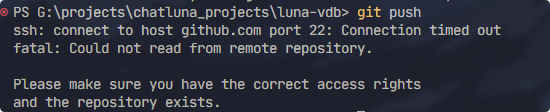
针对这种问题,一般都是配置 ssh 代理解决。
google 搜一下,一般给出的答案是在 ~/.ssh/config 里面添加如下配置:
ProxyCommand connect -S 127.0.0.1:10801 -a none %h %p
Host github.com
User git
Port 22
Hostname github.com
IdentityFile "C:\Users\One\.ssh\id_rsa"
TCPKeepAlive yes
Host ssh.github.com
User git
Port 443
Hostname ssh.github.com
IdentityFile "C:\Users\One\.ssh\id_rsa"
TCPKeepAlive yes
|
但是,这类配置只能在 git bash 里面使用,在 powershell 里面是无法使用的。
在 VS Code 和 Windows Terminal 默认都是用的 powershell ,按照上面配置完后你试一下大概率会出现如下错误:
CreateProcessW failed error:2
posix_spawnp: No such file or directory
|
解决方案
解决方案也很简单,我们只需要手动指定 connect.exe 的地址即可。
ProxyCommand "C:\Program Files\Git\mingw64\bin\connect.exe" -S 127.0.0.1:7890 -a none %h %p
Host github.com
User git
Port 22
Hostname github.com
IdentityFile "C:\Users\One\.ssh\id_rsa"
TCPKeepAlive yes
Host ssh.github.com
User git
Port 443
Hostname ssh.github.com
IdentityFile "C:\Users\One\.ssh\id_rsa"
TCPKeepAlive yes
|
connect.exe 的地址一般在:<你的 git 安装目录>\mingw64\bin\connect.exe。
完成后,可以继续愉快的使用了。